
SUMMARY:
- A vendor portal for government contractors, also called a supplier portal, gives vendors one secure place to onboard, invoice and check payments.
- Contractors carry extra vendor risk because federal rules flow down to subcontractors, audits examine vendor records, and accounts payable teams are targets for payment fraud.
- Five problems show up again and again: hand-keyed invoices, payment status calls, bank changes by email, slow onboarding and stale compliance records.
- A good portal extends the ERP you already run, so Business Central stays the system of record.
- A portal is the wrong choice for a small, stable vendor list or an unfixed approval process.
Table of Contents
- Why Vendor Management Is Harder for Government Contractors
- Five Vendor Problems Every Government Contractor Recognizes
- What Email-Based Vendor Management Really Costs
- What a Vendor Portal for Government Contractors Should Do
- Build, Buy, or Extend: Which Vendor Portal for Government Contractors Fits?
- When a Vendor Portal for Government Contractors Is the Wrong Choice
- How the GovCon365 Vendor Portal Fits
- Next Steps for Your Vendor Process
Email works well when you have ten vendors. At a hundred, it starts to leak. Invoices pile up in shared inboxes. Bank changes arrive as attachments. Nobody can say which insurance certificates have expired.
Government contractors feel this sooner than most companies. You pass federal rules down to your subcontractors. You get audited. And your accounts payable (AP) team sits on the receiving end of payment fraud attempts. A vendor portal for government contractors is one way to fix this. It gives vendors a secure place to do the work that now happens by email and phone.
This article names the problems, shows what they cost, and lists what to look for in any option, including ours.
Why Vendor Management Is Harder for Government Contractors
Vendor management is harder for government contractors because federal rules follow the work down to every subcontractor and supplier. Your records also have to hold up in an audit. A commercial company can run a looser process. You can’t.
Start with flow-down. The Federal Acquisition Regulation (FAR) is the rulebook for federal buying. Many of its clauses pass from the prime contractor to subcontractors. Take FAR 52.209-6. Above a set dollar threshold, it generally bars a prime from subcontracting with a party that is debarred, suspended or proposed for debarment. Proposed subcontractors must say in writing whether they or their principals are excluded. The clause also flows down to subcontracts above the threshold.
Next, look at who your vendors are. Many are small firms, consultants and research partners. Some are individuals. Their tools and habits vary a lot. Their size and socioeconomic status also matter. Primes with small business subcontracting plans report on it.
Then add contract ceilings. Purchase orders and subcontracts have limits. An invoice that runs past the limit causes rework for everyone.
Finally, there is the audit. Auditors ask to see the file. They want the tax form, the insurance certificate, the SAM.gov check and the approval. If that file lives in someone’s inbox, you will spend days finding it.
Five Vendor Problems Every Government Contractor Recognizes
These five problems are common wherever vendor work runs on email. We first built the GovCon365 Vendor Portal for a federal government contractor that provides professional services, and these five problems shaped what we built.
1. Hand-keyed invoices and PO mismatches
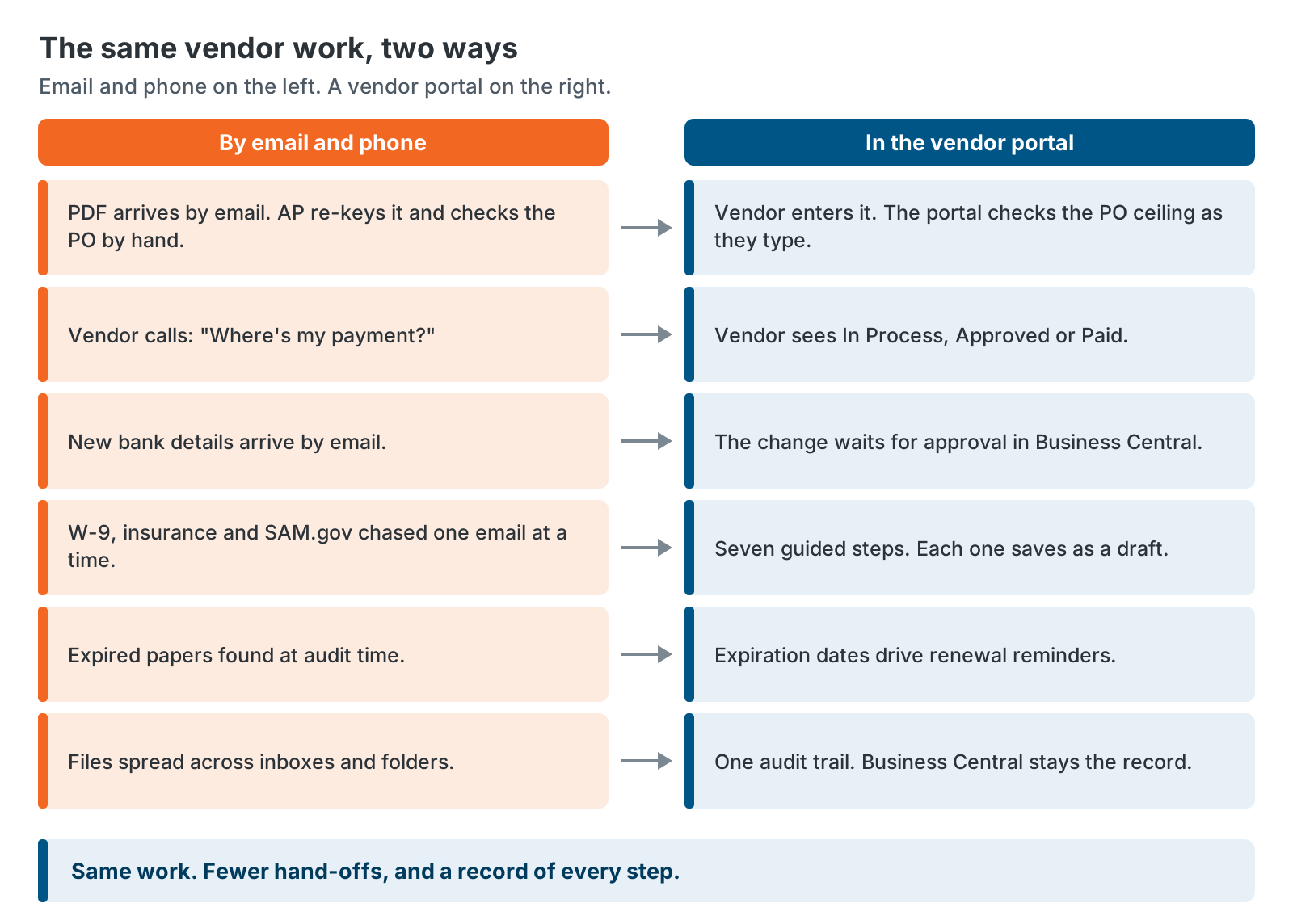
Invoices arrive as PDF attachments. Someone opens each one, finds the purchase order (PO) and keys the numbers into the ERP. Typos happen. So do invoices that run past the PO ceiling.
Here is an example, not a client story. A PO has a $25,000 ceiling. A $50,000 invoice arrives. AP finds out after the invoice is in the queue. Then the email thread starts. Is it a change order, a mistake, or the final bill?
A portal can show the vendor the ceiling, the amount already invoiced and the amount left, before they submit.
2. “Where’s my payment?” calls
Vendors ask the same two questions. Did you get my invoice? When will I be paid? Each one costs AP a call or an email.
It also costs goodwill. Small business partners often have thin cash flow, and federal rules reflect that. Under FAR 52.232-40, the government sometimes speeds up a payment to a prime contractor. When it does, the prime must pass that speed-up to small business subcontractors within 15 days, where practicable. A prime’s small business subcontracting plan under FAR 52.219-9 also includes assurances of prompt payment. It covers notice to the contracting officer about reduced or untimely payments.
3. Bank changes sent by email
A vendor emails new bank details. The message looks right. AP updates the record. The next payment goes to a criminal.
This scam is called business email compromise (BEC). Criminals pose as a trusted sender to redirect money. The FBI’s Internet Crime Complaint Center (IC3) received 24,768 BEC complaints in 2025, with about $3.05 billion in reported losses. In the 2026 survey from the Association for Financial Professionals (AFP), 74% of organizations said BEC affected them in 2025.
We cover this problem in depth in Stop Vendor Bank-Change Fraud Before It Hits Your AP Team.
4. Slow vendor onboarding
A new subcontractor needs a W-9, banking details, insurance certificates, a SAM.gov check and a size classification. Each item shows up in a different email, in a different format, days apart. Someone keeps a spreadsheet of what is missing.
The checks matter. First-tier subcontract reports under FAR 52.204-10 need each subcontractor’s unique entity identifier (UEI) and address. The reports go through the FFATA Subaward Reporting System, and the data becomes public. We walk through each item in A Practical Vendor Onboarding Checklist for Government Contractors.
5. Stale compliance records found at audit time
Insurance expires. A vendor’s small business status changes. A SAM.gov registration comes up for renewal. FAR 52.204-13 says a registered contractor must review and update its SAM.gov data every year.
None of this is visible until someone looks. Often that someone is an auditor. A folder of PDFs has no memory. It can’t tell you what expired last month.
What Email-Based Vendor Management Really Costs
Email-based vendor management costs four things: AP hours, late payments to small business partners, audit findings and fraud exposure. Only the first is easy to measure, so start there.
We don’t have one number that fits your company. Published benchmarks depend on your volume, your tools and your vendor mix. Use your own numbers instead. The worksheet below turns four kinds of vendor work into hours.
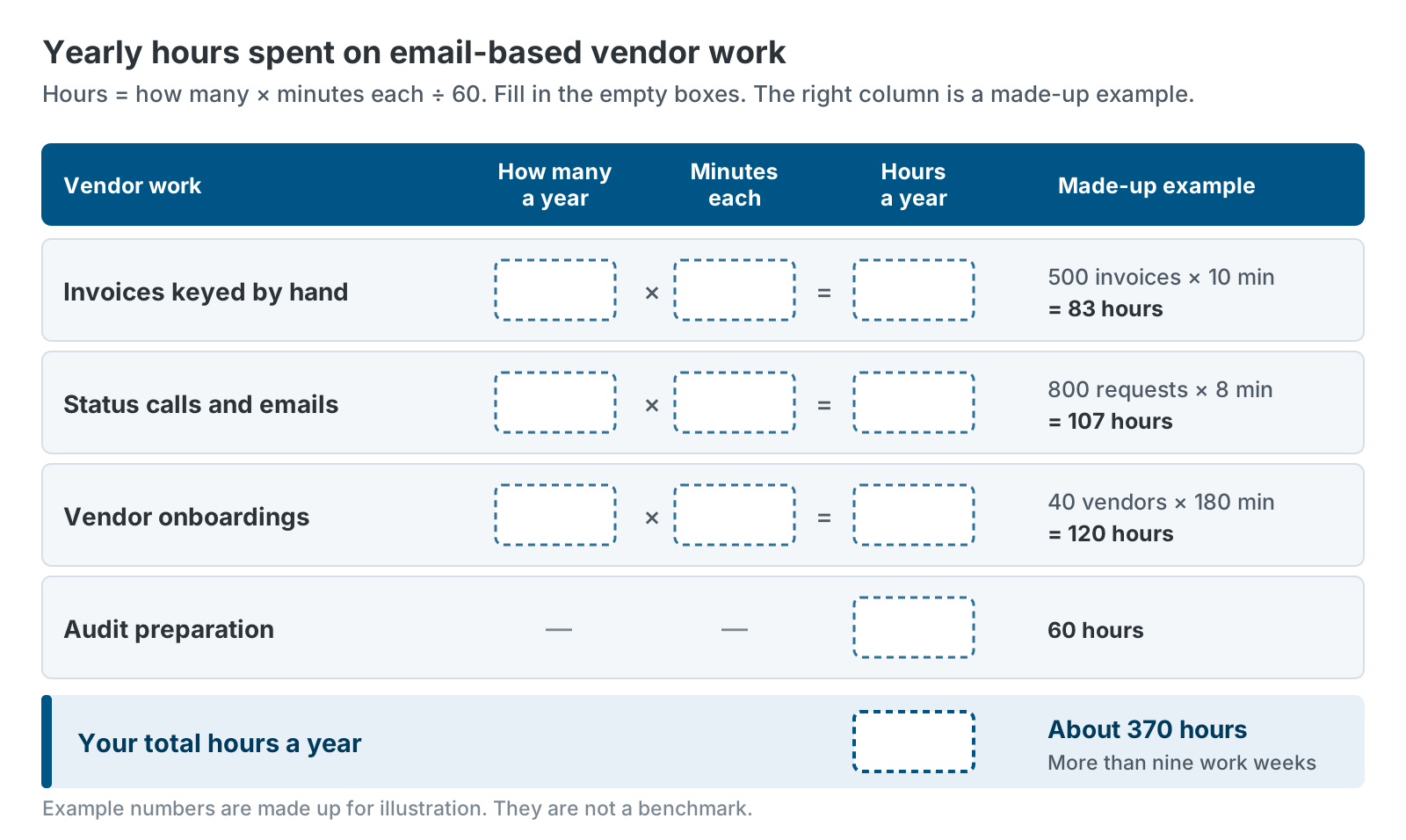
Here is the example from the figure, with made-up numbers. Say you key 500 invoices by hand a year at 10 minutes each. That is about 83 hours. You answer 800 status calls and emails at 8 minutes each. That is about 107 hours. You onboard 40 vendors at 3 hours each. That is 120 hours. You spend 60 hours getting ready for an audit. The total is about 370 hours, or more than nine work weeks. That total leaves out every error and every fraud attempt.
The other three costs are harder to put a number on. Late payments strain relationships with the small businesses you will want on your next proposal. Audit findings take time to fix and stay in your file. Fraud is the hardest to predict. The AFP survey found that 76% of U.S. organizations faced attempted or actual payments fraud in 2025.
Treat the worksheet as a starting point for a conversation with your CFO. If the hours are small, a portal may not pay off yet. If they surprise you, you have your business case.
What a Vendor Portal for Government Contractors Should Do
A vendor portal for government contractors should do four things. Some teams call it a supplier portal. The name changes, but the checklist does not. It lets vendors do their own routine work. It checks every invoice against its PO. It sends sensitive changes through approval. And it keeps a full record. Use the list below to judge any option, ours included.
| What to look for | What it should do | Problem it solves |
|---|---|---|
| Self-service onboarding | Guide vendors through business details, tax forms, banking, insurance and size status. Save drafts. | Slow onboarding |
| PO-validated invoicing | Show open POs with ceiling, amount invoiced and amount left. Check each invoice as it is entered. | Hand-keyed invoices and over-ceiling surprises |
| Payment status | Show each invoice from submitted to paid, read from your ERP. | “Where’s my payment?” calls |
| SAM.gov and FAR support | Look up SAM.gov by UEI or CAGE code. Capture size and socioeconomic status. | Compliance gaps |
| Approval workflows | Hold bank and tax changes until the right people approve them. | Bank-change fraud |
| Secure sign-in | Offer strong sign-in options, such as a one-time passcode sent to the vendor’s email or a password plus multi-factor authentication (MFA). | Account takeover and shared logins |
| ERP stays the system of record | Read from and write to your ERP. Keep no second vendor database. | Data that drifts out of sync |
| Audit trail | Log every vendor and staff action. Keep every document version. | Stale records and audit scrambles |
Build, Buy, or Extend: Which Vendor Portal for Government Contractors Fits?
You have three ways to get a vendor portal: build one, buy a separate supplier platform, or extend the ERP you already run. Each wins in some cases. The right answer depends on your ERP, your vendor count and your in-house skills.
| Option | Best when | Watch out for |
|---|---|---|
| Build a custom portal | You have unusual requirements and developers to maintain it. | You own every bug, upgrade and security patch for years. |
| Buy a separate supplier platform | You run several ERPs, or you want a large supplier network and extras like early-payment programs. | A second vendor database to keep in sync. Check how pricing scales and how well the ERP link works. |
| Extend your ERP | You run Business Central and want one set of vendor data and one set of approvals. | The portal fits only the ERP it was built for. |
We sell the GovCon365 Vendor Portal, so we lean toward extending the ERP for Business Central customers. That is a bias. Weigh it as you would any vendor’s view.
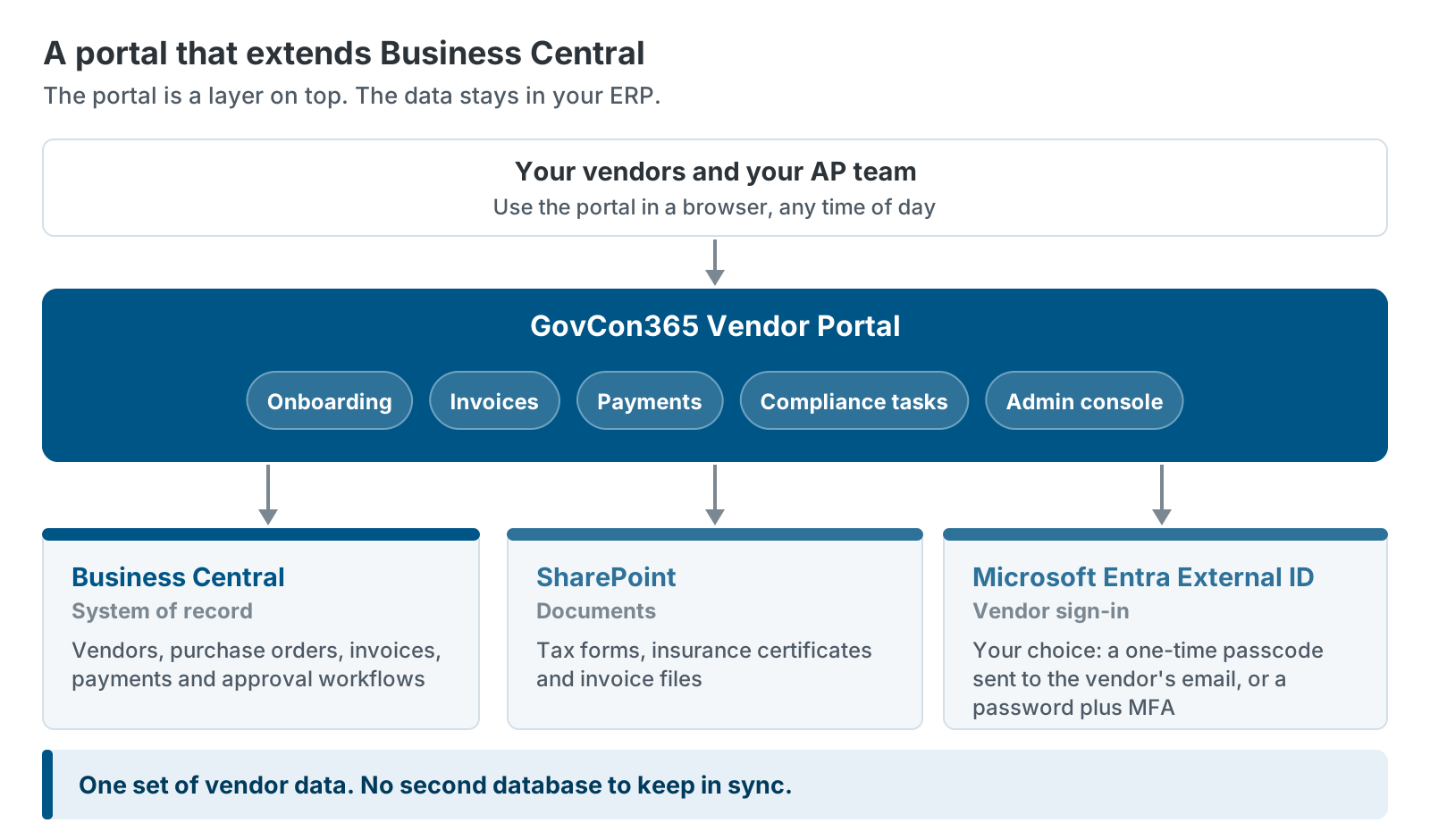
Extending the ERP has one practical benefit. The data stays in one place. Business Central holds vendors, purchase orders, invoices and payments. The portal reads and writes those records. Documents live in SharePoint. Microsoft Entra External ID handles sign-in, with a one-time passcode sent to the vendor’s email or a password plus MFA. Business Central also has built-in approval workflows. A workflow can hold a field change until someone approves it. If the request is rejected, the old data stays in place.
When a Vendor Portal for Government Contractors Is the Wrong Choice
A vendor portal is the wrong choice in four situations. Knowing them will save you money.
You have few vendors, they rarely change and most get paid by check. A shared folder, a spreadsheet and a call-back rule can carry that load.
You don’t run Business Central. Our portal is built for it. If you run another ERP, look at options built for yours.
Your approval process is the real problem. A portal makes a good process faster. It makes a bad one faster too. If nobody knows who approves a bank change, fix that first.
Your vendors can’t or won’t use it. Some vendors will always prefer email. Plan for them. Our portal lets your staff step in and see what a vendor sees, so they can help someone who gets stuck. Even so, expect a few vendors to need hand-holding.
How the GovCon365 Vendor Portal Fits
The GovCon365 Vendor Portal is a secure, self-service website that connects to Microsoft Dynamics 365 Business Central. Vendors onboard, view purchase orders, submit invoices, track payments and keep compliance documents current. Business Central stays your system of record.
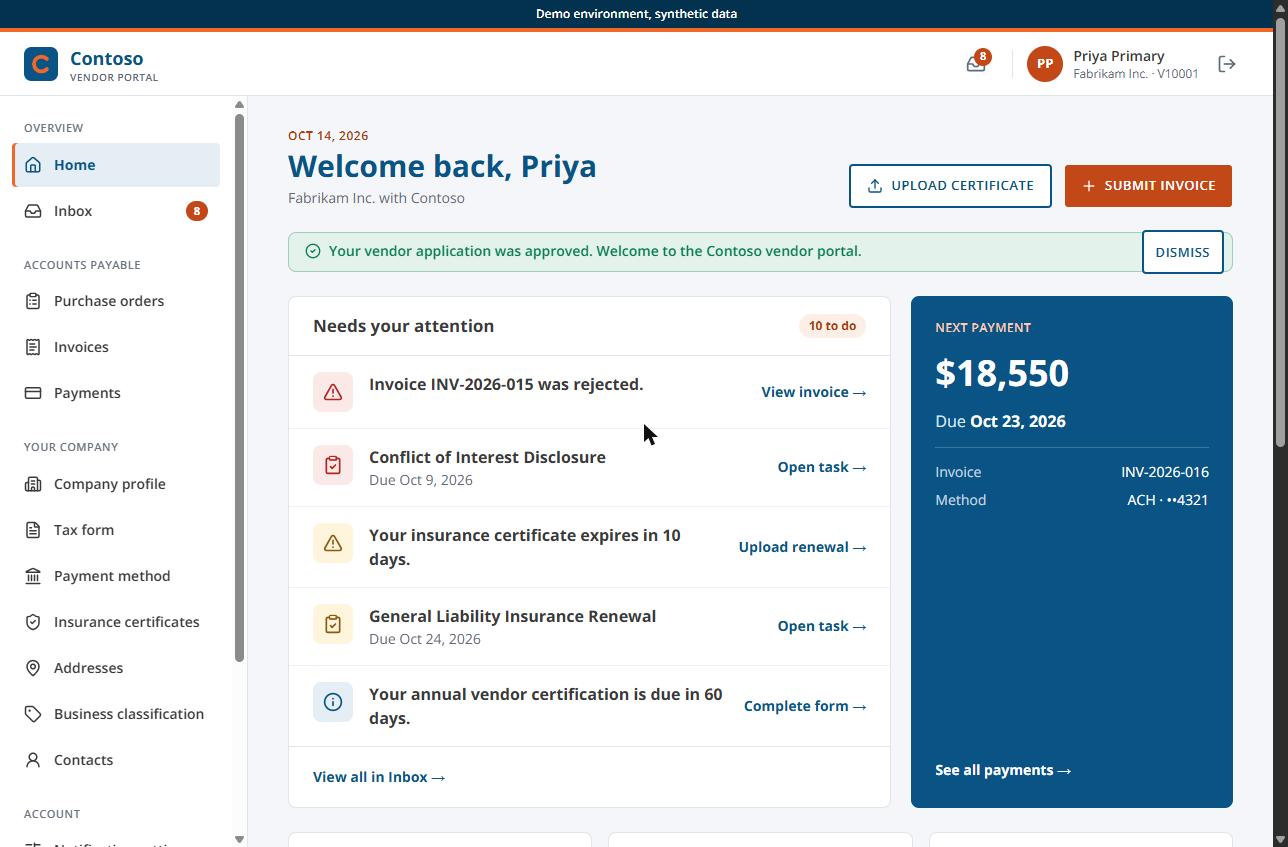
A guided seven-step application collects business details, tax forms, banking, insurance, a live SAM.gov lookup and small business classification. Invoices are checked against the PO ceiling as the vendor enters them. Payment status comes from Business Central vendor ledger entries. Vendors sign in with a one-time passcode sent to their email or with a password plus MFA, whichever mode you choose. Bank and tax changes go through a Business Central approval workflow. Account numbers and tax IDs are masked. Every action is logged.
We first built this portal for a federal government contractor that provides professional services. It now works as a ready-made accelerator for GovCon365 customers. The XTIVIA team that implements and supports GovCon365 delivers it.
It also fits with the rest of the GovCon365 suite. AwardTrack CRM covers the front office, from pipeline to award. Dynamics 365 Business Central covers the back office. The portal connects your vendors to that back office.
Next Steps for Your Vendor Process
If you are weighing a vendor portal for government contractors, start small and start with facts.
- Pick the one of the five problems that costs you the most.
- Fill in the worksheet with your own numbers.
- Choose one group of vendors for a pilot. New vendors are a good first group, because they have no old habits.
- Write down who approves bank and tax changes today.
If you want to see how the portal handles this, we are happy to walk you through it. Talk with us about your vendor process.
Further reading
- FBI IC3 2025 Internet Crime Report — BEC complaint and loss figures
- AFP 2026 Payments Fraud and Control Survey, press release — payments fraud and BEC rates
- FAR 52.209-6 on acquisition.gov — subcontracting with excluded parties
- Use approval workflows in Business Central — how approvals hold a record change
GovCon365 is XTIVIA’s solution set for government contractors on Microsoft Dynamics 365. The team behind it implements and supports Business Central, builds AwardTrack CRM, and built the Vendor Portal.