
SUMMARY:
- Vendor payment fraud prevention starts with one rule: no bank account change takes effect because of an email.
- Vendor bank-change fraud works by posing as a trusted vendor and asking AP to send future payments to a new account.
- Five controls close the easy paths: never accept changes by email, call back on a known number, require two approvals, keep a change log and mask account data.
- Manual controls fail when staff are rushed, or when they call the phone number printed in the suspicious message.
- A vendor portal moves those controls into the process, with approvals in Business Central and a full audit log.
Table of Contents
- How Vendor Bank-Change Fraud Works
- Why Government Contractors Are Targets
- Vendor Payment Fraud Prevention Controls Every AP Team Needs
- Where Manual Vendor Payment Fraud Prevention Breaks Down
- Moving Vendor Payment Fraud Prevention Into a Vendor Portal
- A Seven-Question Self-Check for Your AP Process
- When Portal Controls Are Not Enough
- Next Steps for Vendor Payment Fraud Prevention
Vendor payment fraud prevention comes down to one rule: no bank account change takes effect because of an email. The scam is simple. A criminal poses as a vendor or supplier you trust and asks you to send the next payment to a new account. The money leaves. Later, the real vendor calls to ask where its payment is.
Your accounts payable (AP) team is the target. Not because it is careless, but because it controls the payments. The FBI’s Internet Crime Complaint Center (IC3) received 24,768 business email compromise complaints in 2025, with about $3.05 billion in reported losses. Business email compromise (BEC) is a scam where criminals pose as a trusted sender to redirect money.
This article explains how vendor bank-change fraud works, which controls stop it, and how to move those controls out of email and into your process.
How Vendor Bank-Change Fraud Works
Vendor bank-change fraud works in five steps. A criminal studies your vendor, sends a convincing change request, waits for AP to update the record, and collects the next payment. It often looks routine at every step.
The FBI describes how these scams are built. Criminals set up lookalike email addresses with small spelling changes. They send spearphishing emails that appear to come from a trusted sender. Some use malware to get into real email threads about invoices and billing. Then they time their request so finance staff don’t question it. When a criminal poses as one of your vendors or suppliers, that is vendor impersonation.
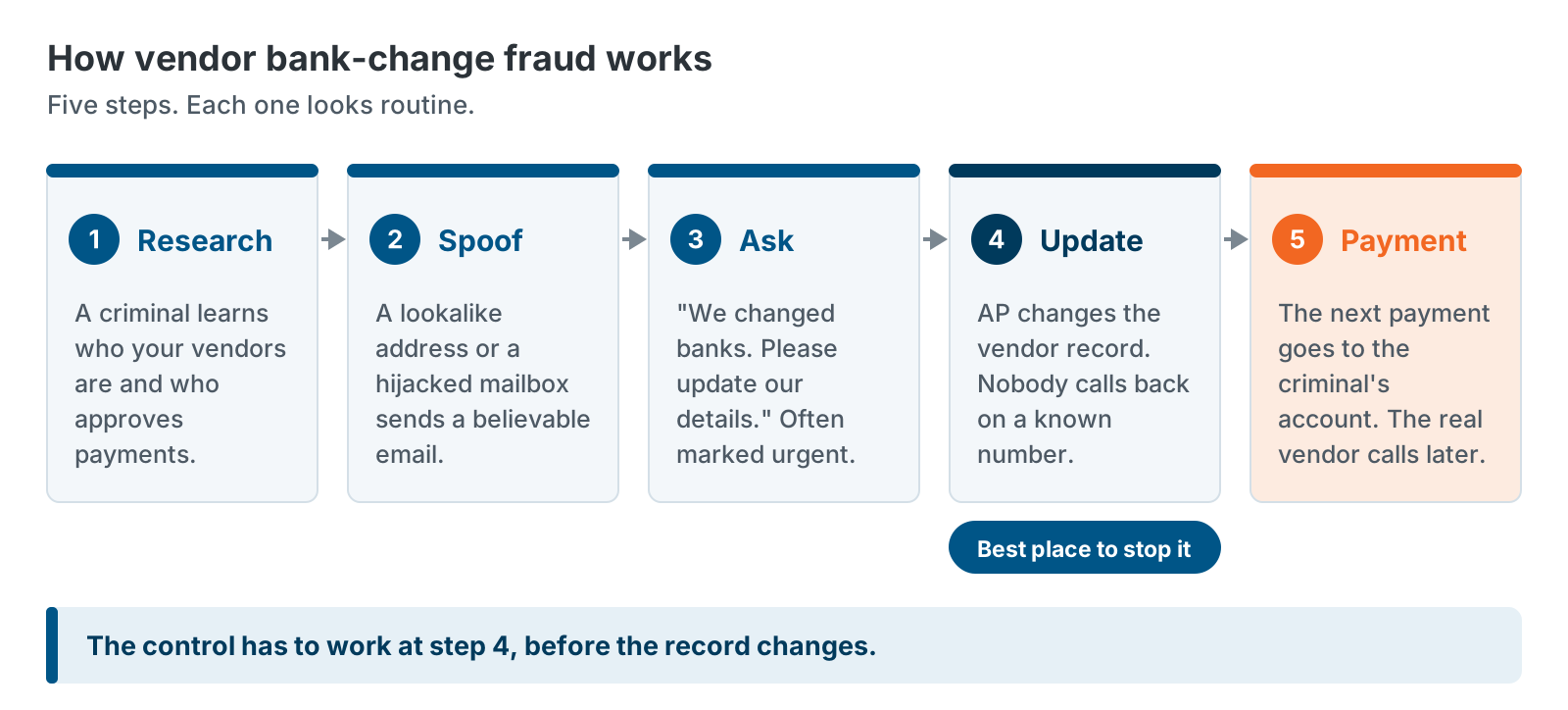
The request usually carries a reason. The vendor “changed banks.” The old account is “being audited.” The payment is “urgent.” Each reason pushes AP to skip a check.
The 2026 survey from the Association for Financial Professionals (AFP) shows what this looks like inside real companies. It describes fraudsters asking for bank account changes through compromised vendor email and phone calls, sometimes with an urgent payment story. In one example, AP confirmed new bank details by calling the number listed in the suspicious email. In another, bad bank details went into the system before the treasury team could confirm them.
Why Government Contractors Are Targets
Government contractors are good targets because payments are large and regular, vendor lists are long, and some award data is public. A criminal can learn a lot before sending a single email.
Federal contract awards are published. First-tier subcontract awards must also be reported under FAR 52.204-10, and the contractor must tell subcontractors that the information will be made public. Sites such as USAspending.gov make federal award data searchable. That gives a criminal a map of who wins what and who the subcontractors are.
Your vendor base adds to the risk. Many vendors are small firms with simple email setups. If one mailbox is hijacked, the criminal inherits a real invoice thread, which makes a fake request easy to believe.
We can’t tell you that contractors are hit more often than other companies. The AFP survey covers organizations across industries. It found that 76% of U.S. organizations faced attempted or actual payments fraud in 2025, and that BEC affected 74% of them. Those numbers apply to you whether or not you hold federal contracts.
Vendor Payment Fraud Prevention Controls Every AP Team Needs
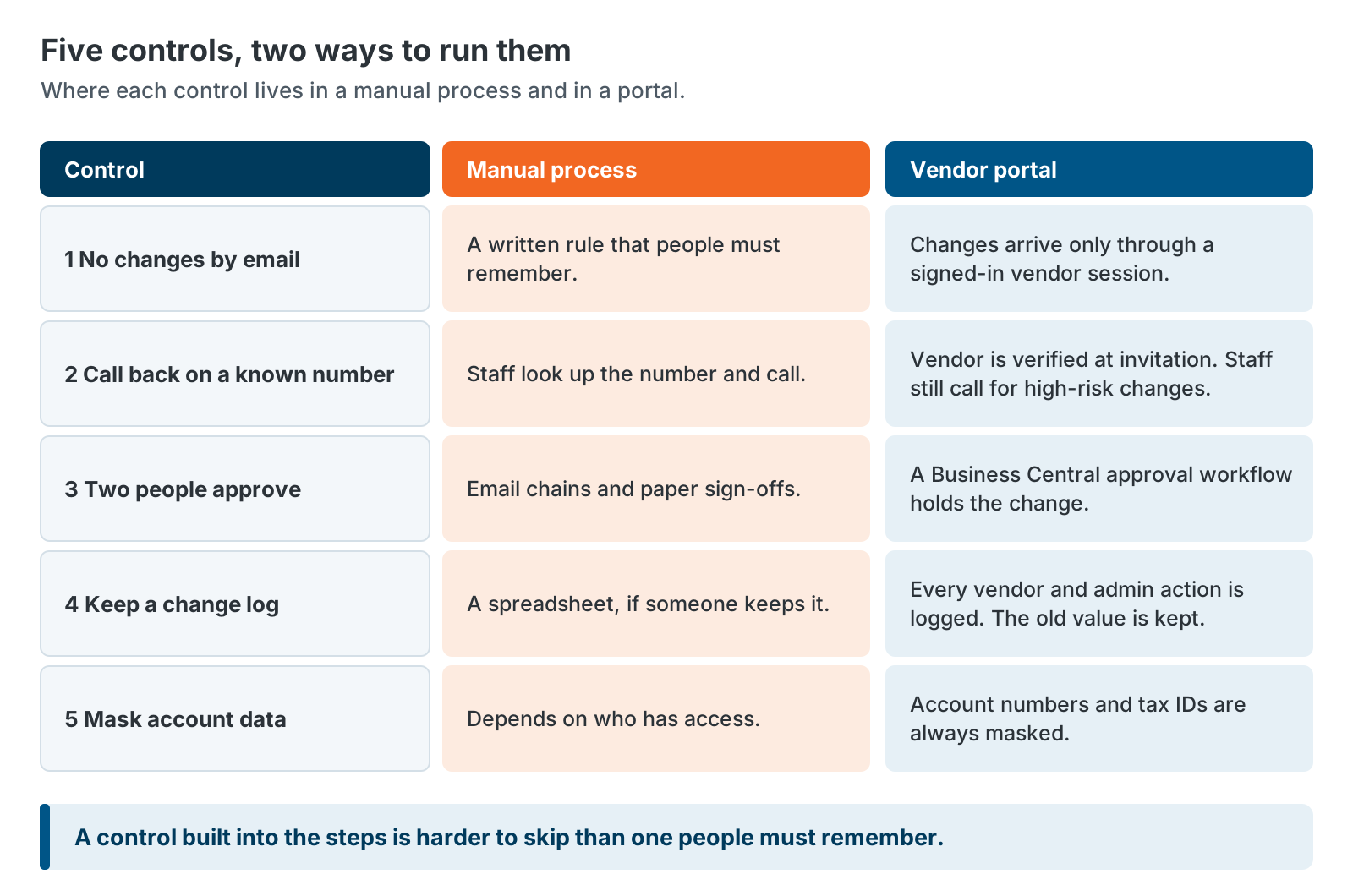
Five controls close the easiest paths for vendor bank-change fraud. Never accept a change by email. Call back on a number you already hold. Require two people to approve. Keep a change log. Mask account data. None of them is new, and most are cheap. The hard part is using them every time.
1. Never accept a bank change by email
Set a written rule. Bank, tax and contact changes don’t take effect because of an email or a phone call alone. In the AFP survey, 91% of organizations said they prohibit starting a payment based on email or other less secure messaging. And 96% said they have policies to verify changes to invoices, bank deposits and contact details.
2. Call back on a number you already hold
Verify every change by phone. Use a number from your vendor record or the signed contract. The FBI gives the same advice: look up the phone number yourself instead of using the one in the suspicious message. In the AFP survey, 94% of organizations said they verify fund transfer requests this way, and 63% of them rated it very effective.
3. Require two people
One person enters the change. A different person approves it. Above a set dollar amount, a senior manager signs off too. In the AFP survey, 94% of organizations said they require senior management sign-off above a threshold. Consider a short hold or a review of the first payment after any change. It costs a day and can stop a large loss.
4. Keep a change log
You need to answer four questions about any bank change: who requested it, who entered it, who approved it and when. Keep the old value, too. If a change turns out to be fraud, the old account is how you restore the record. A log also shows an auditor that your controls ran.
5. Mask and limit account data
Show only the last few digits of account numbers and tax IDs on screens and reports. Limit who can see or edit the full values. Masked data can’t be read off a shared screen, copied into a ticket or forwarded by mistake.
Where Manual Vendor Payment Fraud Prevention Breaks Down
Manual controls break down at the moments that matter most. AP is busy. A request looks routine. Someone wants to be helpful. The controls are sound. The weak point is that they depend on people remembering them every time.
Here are the common ways they fail.
- The call-back uses the wrong number. Someone calls the number in the email signature. The fraudster answers.
- The change gets made first and checked later. A person with edit rights updates the vendor record to “get ahead of it.” The bad details are live before anyone confirms them.
- Urgency wins. A payment is due today. The request comes at 4:45 p.m. The check gets skipped just this once.
- The rule lives in a policy document. New staff haven’t read it. Busy staff don’t think about it.
- Nobody can see the pattern. Without a log and a report, three changes in one week at one vendor look like three normal days.
The answer is not more training alone. Training helps, and 96% of organizations in the AFP survey provide it. The answer is to build the control into the steps people already take, so skipping it takes more effort than following it.
Moving Vendor Payment Fraud Prevention Into a Vendor Portal
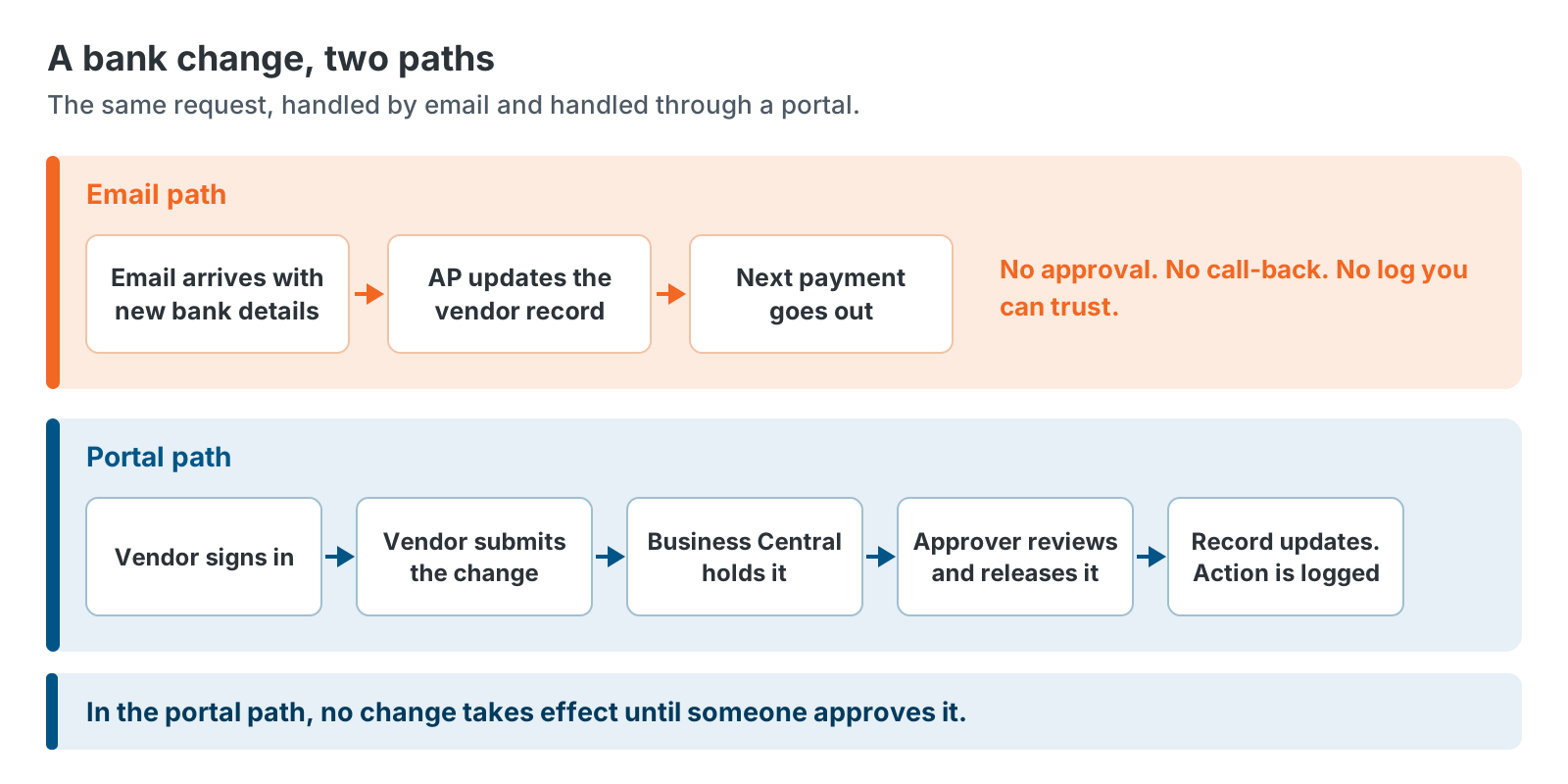
A vendor portal (some teams call it a supplier portal) moves bank-change controls out of email and into the process. Vendors submit changes in a signed-in session. Business Central holds each change until the right people approve it. Nobody emails a bank number to anyone.
Here is how the GovCon365 Vendor Portal handles it.
Verified invitations. Your team invites each vendor from an admin console. The vendor gets a secure invitation it can verify before signing in.
Configurable sign-in. You choose how vendors sign in. One option is a one-time passcode (OTP) sent to the vendor’s email, so there is no password to steal or reuse. The other is a password plus multi-factor authentication (MFA). Sign-in runs on Microsoft Entra External ID. Microsoft’s documentation on External ID sign-in options covers both email with a one-time passcode and email with a password. MFA can be added on top.
Approval before any change takes effect. Bank and tax changes route through a Business Central approval workflow. Microsoft’s documentation on approval workflows explains that a workflow can hold a request to change a field while it keeps the old data. The new value isn’t used until the last approval comes in.
Masked data. Bank account numbers and tax IDs are always masked in the portal.
A full audit log. Every vendor and admin action is logged. Documents are stored in SharePoint. Each Business Central call is limited, on the server, to the signed-in vendor.
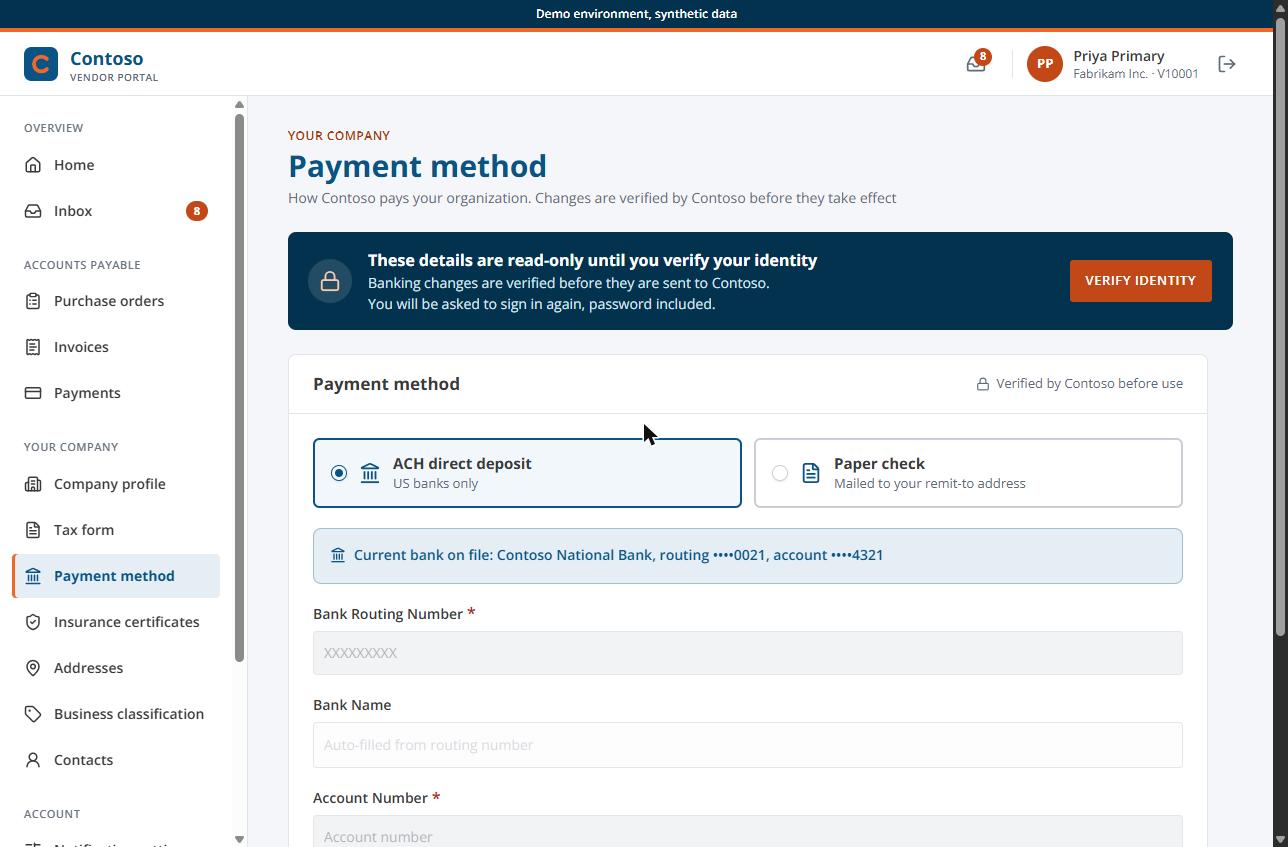
We sell this portal, so keep that in mind as you read. The controls matter more than the product. If you can run them well with the tools you have today, do that.
A Seven-Question Self-Check for Your AP Process
You can test your process in about ten minutes. Answer each question with yes or no, and be honest about what happens on a bad day.
| # | Question | Yes or no |
|---|---|---|
| 1 | Do you reject bank-change requests that arrive by email alone? | |
| 2 | Do you verify every change by calling a number you already had on file? | |
| 3 | Does a second person approve every bank and tax change before it takes effect? | |
| 4 | Do you keep the old bank details, with a log of who changed what and when? | |
| 5 | Are account numbers and tax IDs masked for most users on screens and reports? | |
| 6 | Can you list every bank change from the last 12 months in one report? | |
| 7 | Do you hold or review the first payment after a bank change? |
Seven yeses means your controls are in good shape. Five or six means you have gaps to close. Four or fewer means you should start this week.
If you have a no on question 3, check who can edit vendor bank fields in Business Central today. Many teams find that more people have edit rights than they expected.
When Portal Controls Are Not Enough
A vendor portal helps, but it is not a complete answer. It only governs changes made through it, and fraud has other doors.
If an AP clerk can still edit vendor bank details directly in Business Central, a criminal who tricks that clerk bypasses the portal. Restrict edit rights, and route those edits through the same approval.
A vendor’s own user account can be taken over. Keep call-back verification for high-risk cases, such as the first change after a long gap, or a change that arrives with an urgent payment request.
Payment methods matter too. In the AFP survey, checks were the most targeted payment method at 58%. Also, 87% of organizations still use checks, and 68% use them for vendor payments. Mailed checks need controls of their own.
Finally, other scams don’t touch vendor records. A fake executive request to wire money never passes through a portal. Training and approval rules still apply.
Next Steps for Vendor Payment Fraud Prevention
Start with what you can do this week. Vendor payment fraud prevention doesn’t need new software to begin.
- Run the seven-question self-check with your AP lead.
- Write the rule: no bank change by email alone.
- Review who can edit vendor bank fields in your ERP.
- Pull a report of bank changes from the last year and look for patterns.
If you want to see how the portal builds these controls into the process, schedule a demo or download the Vendor Portal datasheet (PDF).
Two related reads: Why Government Contractors Are Outgrowing Email-Based Vendor Management covers why email breaks down at scale. A Practical Vendor Onboarding Checklist for Government Contractors covers the banking step on day one. The GovCon365 Vendor Portal page has the full feature list. It runs on Dynamics 365 Business Central.
Further reading
- FBI IC3 2025 Internet Crime Report — BEC complaints and reported losses
- FBI guidance on business email compromise — how the scam works and how to protect yourself
- AFP 2026 Payments Fraud and Control Survey, press release — payments fraud and BEC rates
- Use approval workflows in Business Central — how a workflow can hold a field change
GovCon365 is XTIVIA’s solution set for government contractors on Microsoft Dynamics 365. The team behind it implements and supports Business Central, builds AwardTrack CRM, and built the Vendor Portal.