
SUMMARY:
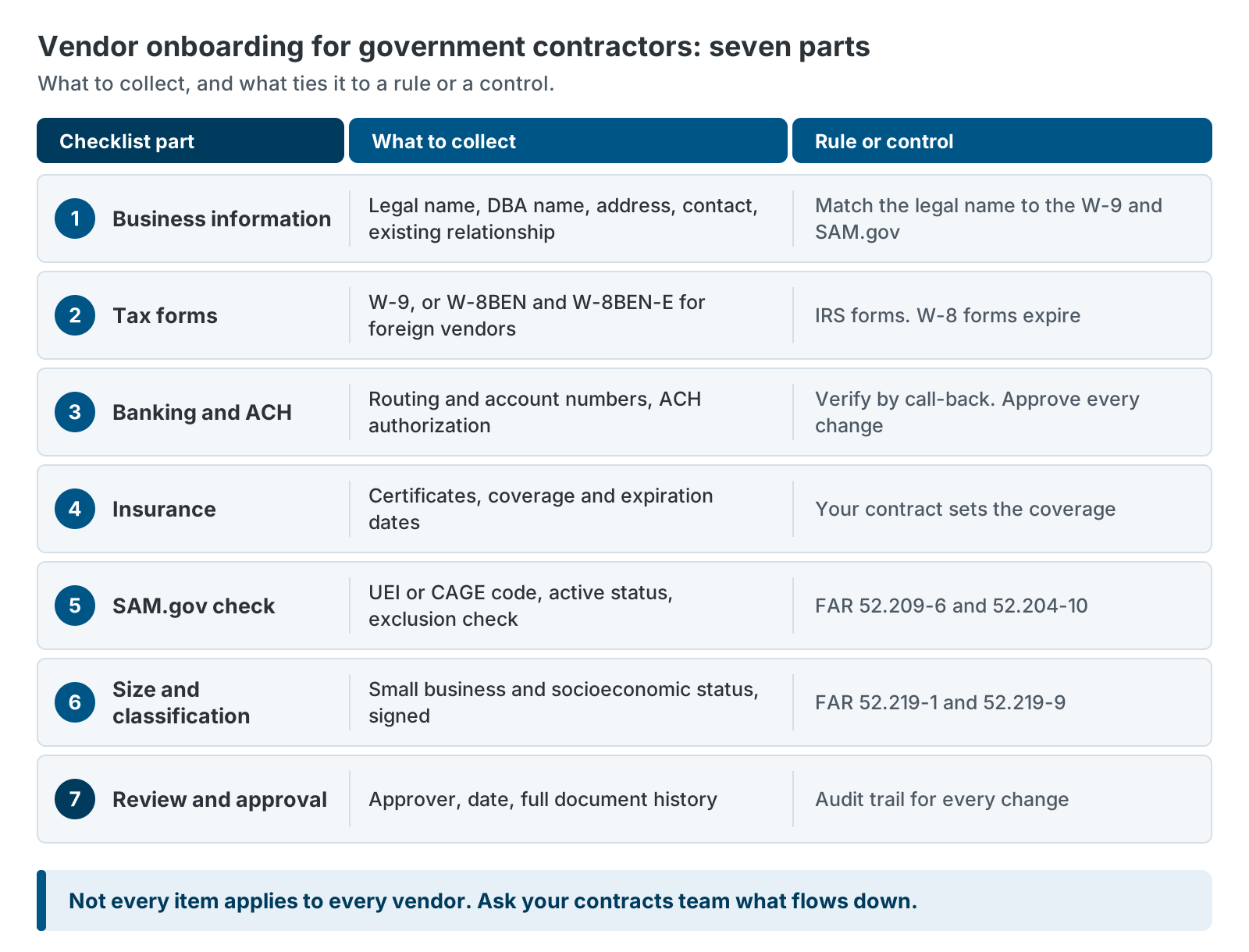
- Vendor onboarding for government contractors should cover seven things: business details, tax forms, banking, insurance, SAM.gov status, size and socioeconomic classification, and approval.
- A W-9 alone is not enough, because federal rules ask primes to know whether subcontractors are excluded, registered and small.
- Onboarding slows down when nobody can see what is still missing, not because the checks are hard.
- Onboarding is not one-time: insurance, W-8 forms, SAM.gov registrations and size status all expire or change.
- A guided portal can turn the checklist into a seven-step flow that saves drafts, looks up SAM.gov and keeps the record current.
Table of Contents
- What Vendor Onboarding for Government Contractors Must Cover
- Vendor Onboarding for Government Contractors: The Seven-Part Checklist
- Where Vendor Onboarding Usually Breaks Down
- Keeping Vendor Records Current After Day One
- How a Guided Portal Turns the Checklist Into a Seven-Step Flow
- When a Checklist Is Enough
- Next Steps for Vendor Onboarding for Government Contractors
Vendor onboarding for government contractors is the work of collecting, checking and approving what you need before you pay a new subcontractor or supplier. Most teams start with a W-9 and a bank form. Then the gaps show up. The insurance certificate is missing. Nobody checked SAM.gov. The vendor’s size status is a guess.
This article gives you a seven-part checklist you can use today. It explains why each item matters, what the federal rules say, and where onboarding usually stalls. It also shows how a guided portal can turn the checklist into a flow your vendors complete on their own.
What Vendor Onboarding for Government Contractors Must Cover
Vendor onboarding for government contractors must cover more than a W-9. You also need to confirm banking, insurance, SAM.gov status and small business classification, and you need a record of who approved the vendor. Several of these tie back to federal rules.
Here is why. Under FAR 52.209-6, proposed subcontractors above a set dollar threshold must state in writing whether they or their principals are excluded from federal contracting. First-tier subcontract reports under FAR 52.204-10 need each subcontractor’s unique entity identifier (UEI) and address. If you hold a small business subcontracting plan under FAR 52.219-9, you report subcontract awards to small business categories through the government’s eSRS system. And FAR 52.219-1 sets out the size and socioeconomic representations that offerors make.
Not every item applies to every vendor. Which clauses flow down depends on your prime contract and the subcontract. Ask your contracts team which ones apply to yours.
Vendors differ too. A U.S. consulting firm, an individual consultant, a university and a foreign company each need slightly different paperwork. A good process handles those cases without starting over.
Vendor Onboarding for Government Contractors: The Seven-Part Checklist
Use these seven parts in order. The early items are fast. The later ones take more care.
1. Business information and the existing relationship
Collect the legal name, any “doing business as” name, mailing address, general contact email and website. Ask whether the vendor already does business with you. Ask whether anyone at the vendor was ever your employee. Your conflict-of-interest policy decides what you do with the answer.
Match the legal name exactly to the name on the W-9 and in SAM.gov. Mismatched names cause trouble later with tax reporting and records.
2. Tax forms: W-9 or W-8BEN and W-8BEN-E
U.S. vendors give you a Form W-9. It supplies a correct taxpayer identification number (TIN) to a payer that must file information returns with the IRS. Foreign individuals use Form W-8BEN. Foreign entities use Form W-8BEN-E.
W-8 forms expire. The IRS says a Form W-8BEN is generally valid until the end of the third calendar year after signing. Record the signing date. For W-8BEN-E, check the form instructions.
You can also check that a name and TIN match before you file. The IRS offers a TIN Matching service for this. Only payers in the IRS Payer Account File, and their agents, can use it. Ask your tax team whether you qualify.
3. Banking and ACH
Collect bank details through a secure form, never by email. Ask for the routing number and the account number twice. Get an Automated Clearing House (ACH) authorization from someone with the authority to give it. Then verify the details by calling a number you already hold.
Bank details are what fraudsters want most. We cover the controls in Stop Vendor Bank-Change Fraud Before It Hits Your AP Team. The short version: no bank change takes effect by email, and every change needs an approval.
4. Insurance certificates and expiration dates
Your contract sets the coverage you need. Collect a certificate for each policy. Check the coverage types and limits against the contract, and check any wording the contract requires, such as additional insured status.
Record each expiration date. Those dates are what drive renewal reminders. Let the vendor’s insurance broker send the certificate directly if that is easier for them. Some vendors, such as a self-insured university, may not need certificates at all. Allow for that case so it doesn’t block onboarding.
5. SAM.gov check by UEI or CAGE code
SAM.gov is the federal System for Award Management. A vendor’s UEI is its unique identifier there. A Commercial and Government Entity (CAGE) code is a second identifier for some entities. Look up the vendor by either one. Confirm four things: the registration is active, the legal name and address match, the registration has not expired and there is no active exclusion.
Exclusion records are the key check. FAR 52.209-6 limits subcontracting with debarred, suspended or proposed-for-debarment parties above its threshold. Exclusion records live in SAM, and you can search them even for a vendor that is not registered.
Save the UEI in the vendor record. You will need it for subcontract reporting.
Not every vendor is registered in SAM.gov. A small firm that never held a federal award may not be. That is fine, as long as the exclusion check is clean. Decide your policy and apply it the same way every time.
6. Size and socioeconomic classification
FAR 52.219-1 lists the categories: small business, small disadvantaged business, women-owned small business, veteran-owned small business, service-disabled veteran-owned small business and HUBZone small business. The clause also warns that misrepresenting small business status can lead to fines, prison, suspension and debarment.
Why do you care? If you have a subcontracting plan, these categories drive your reports. Collect each vendor’s own representation, the date and a signed copy.
Two cautions. First, size depends on the vendor’s industry code (NAICS), and it changes over time. A vendor that was small last year may not be small now. Second, some categories tie to SBA certification, so verify them instead of taking a checkbox on trust.
7. Review, approval and records
Someone other than the person who collected the paperwork should approve the vendor. Record who approved it and when. Keep every document version and every change. When an auditor asks for the file, you should be able to produce it in minutes, not days.
Where Vendor Onboarding Usually Breaks Down
Vendor onboarding usually breaks down in the gaps between steps, not in the steps themselves. The checks are quick once the information is in hand. Getting it all in one place is the slow part.
These are the common failure points.
- Chasing items one email at a time. Each request goes out alone. Each reply comes back days later.
- Wrong or incomplete forms. A W-9 arrives unsigned. A foreign vendor sends a W-9 instead of a W-8BEN-E. Each fix is another email.
- Names that don’t match. The W-9, the bank account and SAM.gov each show a slightly different name.
- No single view of status. The tracking spreadsheet is stale. Nobody can say what is still missing.
- Approval waits on one person. The vendor is ready, but the one approver is on leave.
- Vendors don’t know what you need. Without a clear list, they send what they think you want.
A good fix is a single list with a clear owner for each item. Give vendors one place to complete it, and give staff one place to see status.
Keeping Vendor Records Current After Day One
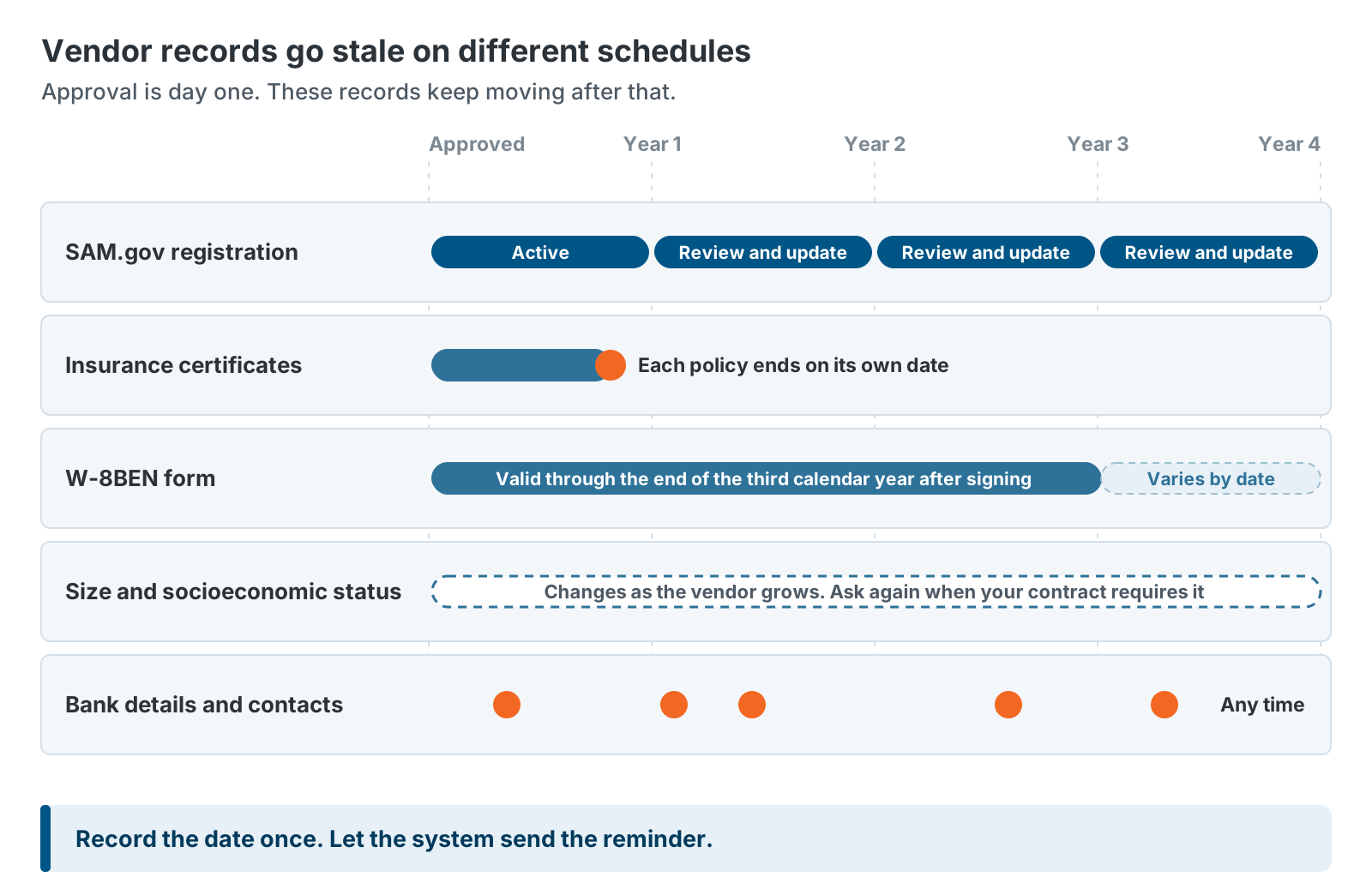
Vendor records start to go stale the day you approve them. Different parts expire on different schedules, so track each one. The table shows what to watch.
| Record | What changes | What to track |
|---|---|---|
| SAM.gov registration | A registered contractor must review and update its SAM.gov data every year (FAR 52.204-13). | Expiration date from the SAM.gov record |
| Insurance certificates | Policies renew or lapse on their own schedule. | Expiration date for each policy |
| W-8 forms | A W-8BEN is generally valid through the end of the third calendar year after signing. | Signing date and expiry |
| Size and socioeconomic status | Size changes as the vendor grows. Status can change. | Date of the last representation |
| Bank details and contacts | They can change at any time. | Approval and change log |
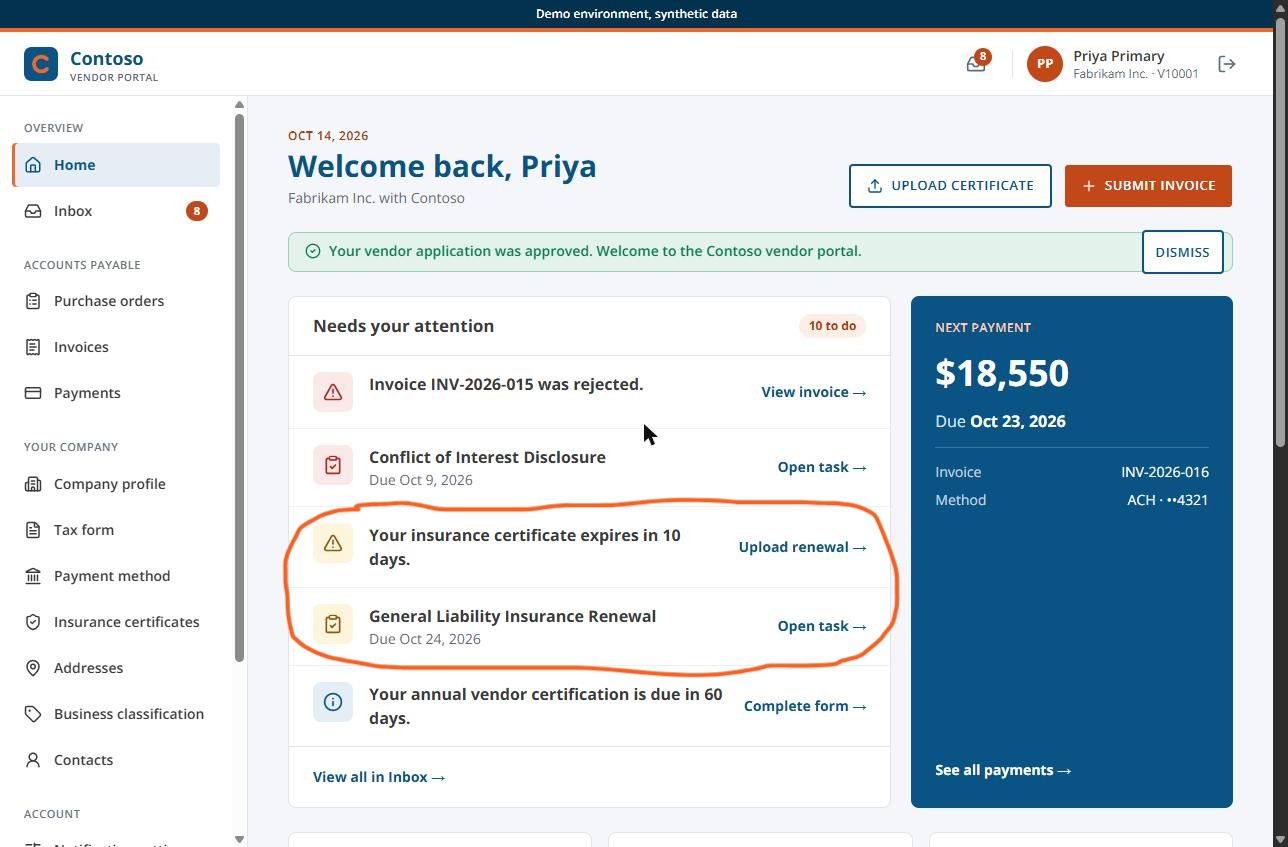
Make the system do the remembering. Staff enter expiration dates once. The system sends reminders to the vendor, then to your team. A vendor that sees “Your General Liability policy expires in 18 days” can fix it before it becomes your audit finding.
How a Guided Portal Turns the Checklist Into a Seven-Step Flow
Some teams call it a supplier portal. Either way, a guided vendor portal turns the seven-part checklist into a seven-step application that vendors complete on their own. Each step maps to one part of the checklist. The portal checks what it can and flags what is missing.
The GovCon365 Vendor Portal follows this order: Business Info, Tax, Banking, Insurance, SAM.gov, Classification, and Review and Submit.
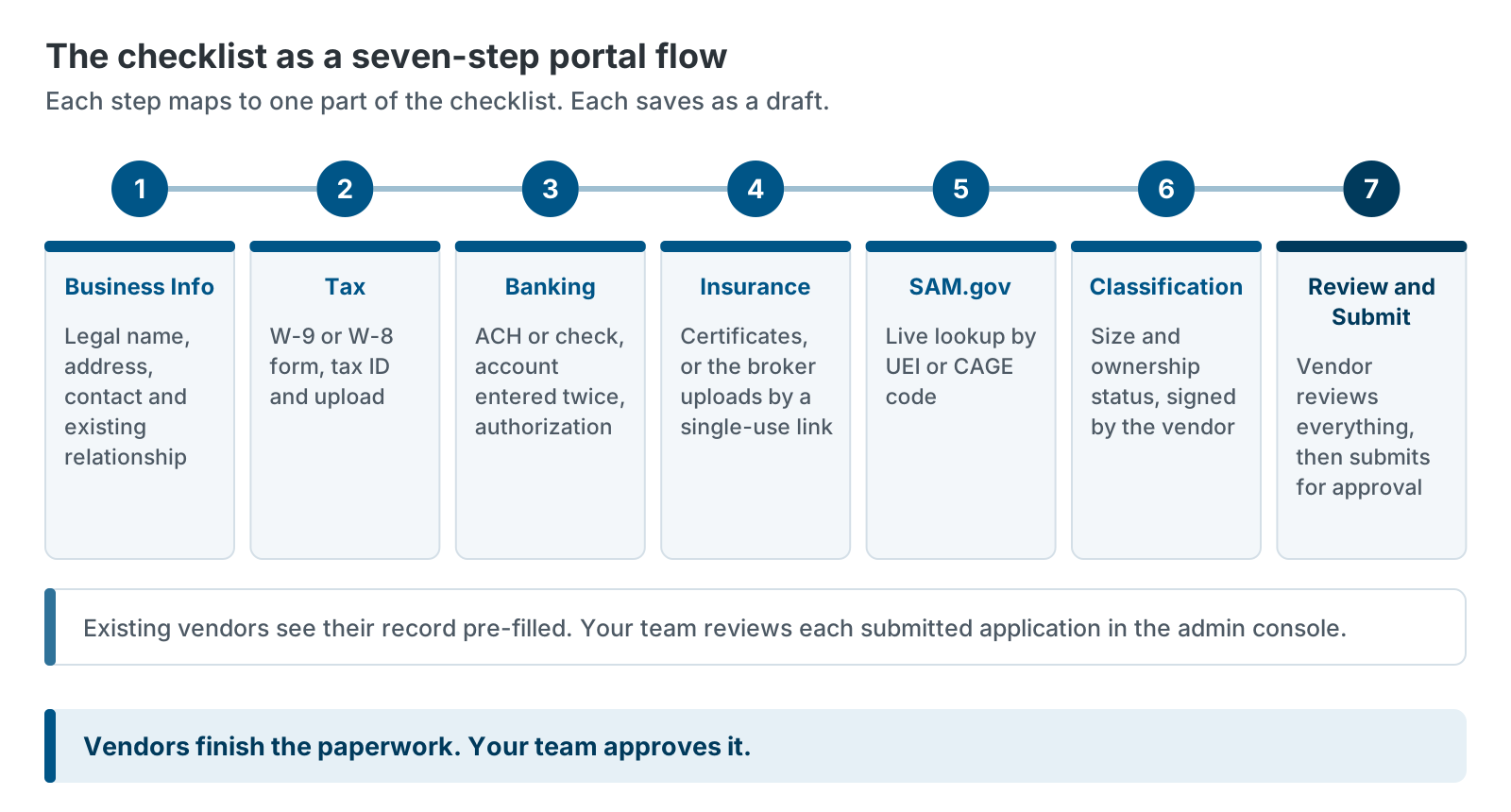
A few details make the flow work in practice. Your team invites the vendor, and the vendor can verify the invitation before signing in. Vendors then sign in with a one-time passcode sent to their email or with a password plus MFA, whichever mode your team sets. Each step saves as a draft, so a vendor can stop and come back. Existing vendors see their record already filled in. The SAM.gov step runs a live lookup by UEI or CAGE code and shows the registration status and details. A vendor can send its insurance broker a secure, single-use link to upload a certificate, with no portal account needed. At the end, the vendor reviews everything before submitting.

After submission, your team works from one admin console. It lists every vendor by status: Active, Invited, In Review or Pending Vendor Action. Staff can assign compliance tasks and track each one from Received to Approved. Expiration dates you record drive renewal reminders.
We sell this portal, so weigh our view with that in mind. The checklist works with or without it. The GovCon365 Vendor Portal runs on Dynamics 365 Business Central, so approved vendor data stays in your ERP. It also pairs with AwardTrack CRM, which tracks the subcontracts and teaming relationships behind these vendors.
When a Checklist Is Enough
A checklist is enough when you onboard only a few vendors a year and your vendors rarely change. In that case, a shared folder, a tracking sheet and calendar reminders can do the job.
A portal starts to pay off when volume or risk grows. You onboard vendors often. You chase the same items every time. You miss expiration dates. Or your auditors ask for records faster than you can find them.
If you are not sure where you stand, count the items you chased last month. Then count the expiration dates you found out about late. The two numbers will tell you whether the checklist is carrying the load.
Either way, the checklist helps. Start with it. If you later add a portal, you will already know what you want it to do.
Next Steps for Vendor Onboarding for Government Contractors
You can improve vendor onboarding for government contractors this week without buying anything.
- Compare your current process to the seven-part checklist. Mark each gap.
- Ask your contracts team which FAR clauses flow down to your subcontractors.
- Add expiration dates to your vendor records for insurance, W-8 forms and SAM.gov.
- Pick one owner for each checklist item.
If you want to see how the portal handles onboarding, talk with us about your vendor process. You can also read why email breaks down as your vendor list grows in Why Government Contractors Are Outgrowing Email-Based Vendor Management.
Further reading
- FAR 52.209-6 on acquisition.gov — subcontracting with excluded parties
- FAR 52.219-1 on acquisition.gov — small business program representations
- IRS Form W-9 page — what the form is for
- IRS instructions for Form W-8BEN — who provides it and how long it stays valid
- SAM.gov — registration, entity and exclusion search
GovCon365 is XTIVIA’s solution set for government contractors on Microsoft Dynamics 365. The team behind it implements and supports Business Central, builds AwardTrack CRM, and built the Vendor Portal.